01
Ground the Problem
Audit tickets. Map failure modes.
TechnoWizards handled millions of customer conversations across healthcare, banking, and logistics. The AI was capable. The system around it wasn't.
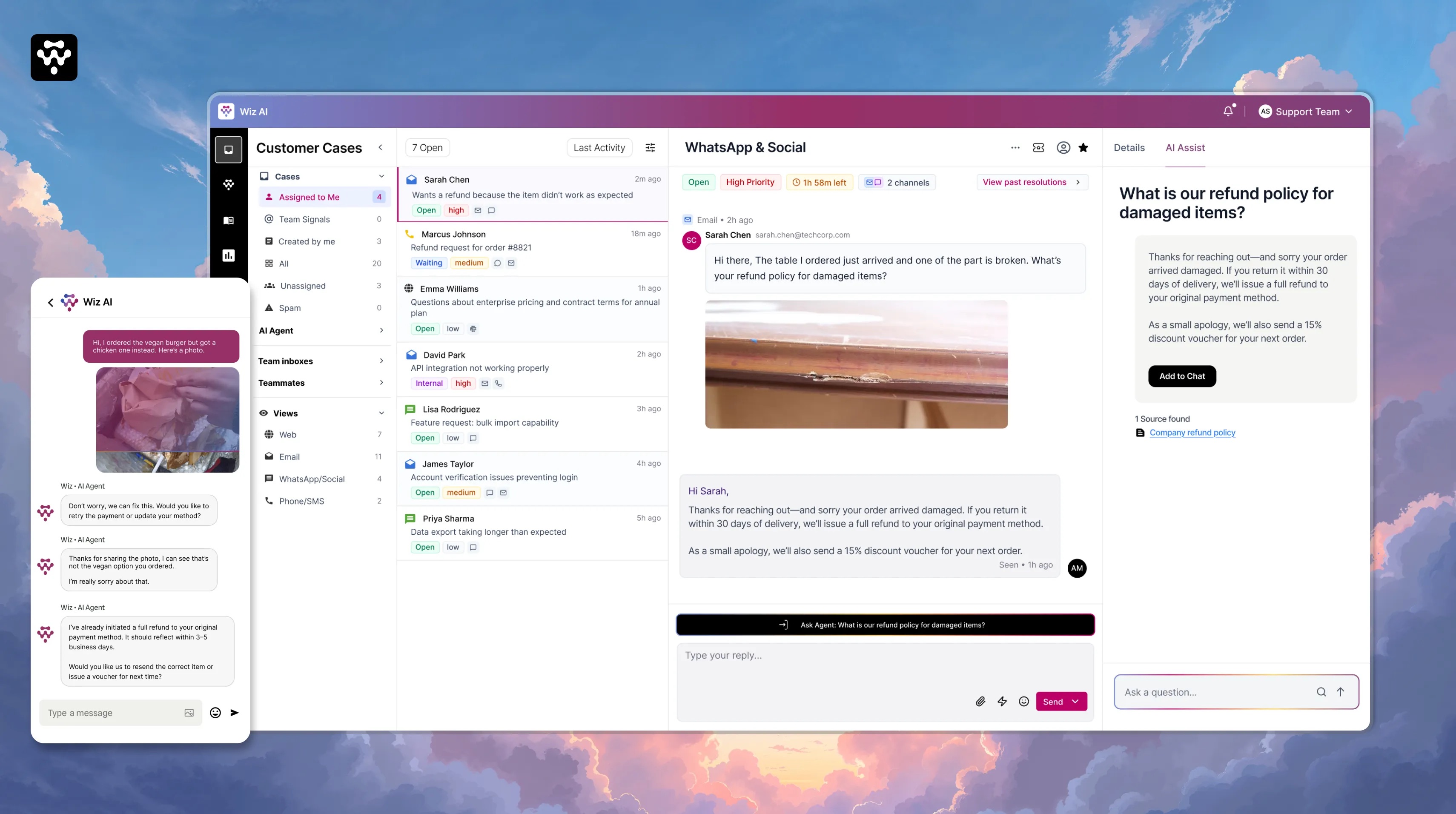
TechnoWizards is a multi-channel customer engagement platform serving enterprise teams in healthcare, banking, government, logistics, and retail — industries where a wrong AI answer isn't just annoying. It's a lawsuit.
They had a powerful chatbot. They had happy customers on simple queries. But complex cases — refunds, billing disputes, clinical authorizations — were silently breaking the company.
I led product design for the Helpdesk experience — the internal workspace where human agents and AI collaborate to resolve complex support cases. This was not a redesign. This was a 0-to-1 product built inside an 8-month window.
The bot was smart. The system around it was broken.
Before
After
THE OUTCOME, BEFORE YOU READ THE STORY.
Was 15–20 min.
Was 65–85%.
Was 30–40%.
You just bought a 400-pound solid oak dining table. It arrives with one of the carved legs split down the middle. You open WhatsApp and type: "My table arrived broken. I need a refund."
This isn't a bot problem. It's a system problem.
Conversations span WhatsApp, Email, Helpdesk, and Phone. Each handoff loses context. Agents re-triage from scratch. The customer feels like they're talking to an organization with severe amnesia.
Teams see drop-off numbers but can't diagnose why. Was it the AI response? The link? The rephrase loop? There's no step-level failure analysis — just a black box.
The bot filtered out easy work and concentrated complexity on the people least equipped to handle it efficiently. Multi-step cases all escalate to senior staff.
A refund for damaged goods. Three agents. Three answers. Same scenario. Zero consistency. No audit trail. Free text is the graveyard of data analysis.
Supporting diverse industries requires extensive custom flows. A non-technical support ops manager shouldn't need an engineer every time a policy changes.
Teams react to failures after they surface. There's no tooling to detect emerging patterns or failure modes early.
Reviewed anonymized tickets and escalation logs. Traced how conversations flowed: chatbot to helpdesk to resolution (or not). Mapped where context was gained, lost, distorted.
Analyzed public support interactions from SaaS and services companies. Focus: cases that started in chatbots and ended with human agents. Looking for the exact moment the system failed.
Interviews with support leads and senior agents. Questions focused on: how they use bots, helpdesks, and how they interpret policy under pressure. Key finding: all 6 felt the tools helped them log — not think or decide.
Deep study of Intercom, Zendesk, Help Scout, and emerging agentic platforms. Focus: where AI ends and humans begin, whether AI is a surface feature or embedded in the core workflow.
35–40%
Agents re-asked questions the bot had already collected. Why? The transcript was a wall of text. Faster to ask again than read 40 lines. The interface actively encouraged terrible customer service.
25–30%
Showed clear policy ambiguity. Bot said one thing. Human did another. Decision documented only as "customer was upset, issued refund." Free text is the graveyard of data analysis.
6/6
"The hard, messy cases still land on my senior team, and the tools don't help us think or decide — just log and respond." Every single one.
Why weren't teams automating more than 30–40% of tickets if LLMs can technically answer 80% of questions?
It's not stubbornness. It's not job preservation. It's risk calculus. Support teams capped automation at 40% because they mathematically could not trust legacy bots to handle high-stakes decisions without guardrails.
The design problem wasn't "make AI smarter." It was "make AI trustworthy enough to be given more."
Bot mishandles a password reset
Customer annoyed.
Bot mishandles a clinical authorization
Company sued.
The temptation was to bolt a smarter AI onto the existing infrastructure.
But the infrastructure was the problem.
"Put a Ferrari engine in a golf cart. The moment you hit the gas, the frame tears itself apart."
Engineering analogy — internal design review
The trap
An LLM generates conversational output at lightning speed. But if the surrounding infrastructure — data pipelines, policy guardrails, routing logic — is built for rigid rules-based interactions, the LLM will confidently generate policy violations at scale. It will hallucinate a refund policy and promise a customer $1,000 in ten seconds.
The real question
Every prior helpdesk was designed to help agents close tickets faster. But speed isn't the constraint. Trust is. The real design problem was: how do you build an interface that makes high-stakes AI decisions safe enough to actually act on?
The shift
We stopped designing for chat throughput and started designing for decision confidence. That changed everything — context architecture, policy retrieval, approval flows, audit trails. The interface had to earn trust before it could earn autonomy.
Before
Optimizing Conversations
After
Optimizing Decisions
01
Bot and human conversations must exist in one system of record. No more baton thrown into the crowd.
02
Policies, context, and decision-making must be applied uniformly — not dependent on which agent picks up the ticket.
03
As case volume grows, the system must help teams handle complexity with confidence — not just speed.
Before any wireframe, my co-designer and I spent weeks mapping the existing support system. Not the ideal flow. The real one. How conversations entered. Where context broke. How decisions were made across teams and tools.
During beta, there was zero user telemetry data. No click tracking. No heatmaps. So we did manual archaeology of 200+ raw chat transcripts — reading timestamps to see context loss happening in real time. We didn't guess the information architecture. We reverse-engineered it from the failures of the past.
01
Audit tickets. Map failure modes.
02
Map information flows and trust gaps.
03
Information hierarchy. Decision scaffolding.
04
Validate with edge cases and real agents.
05
Measure confidence. Refine and ship.
Every escalated case arrived in Zendesk as a wall of plain text. The first thing every agent typed was: "Can I get your order number?"
We deliberately violated the industry norm. Intercom centers the chat thread. We rejected that hierarchy — centering case metadata, customer history, and AI decision tools instead. The interface literally enforces the behavior shift: agents read the customer's lifetime value before they read the complaint.
Trade-off → We limited initial integrations to WhatsApp, Email, and Messenger. 80% of volume. Owned those three flawlessly before anything else.
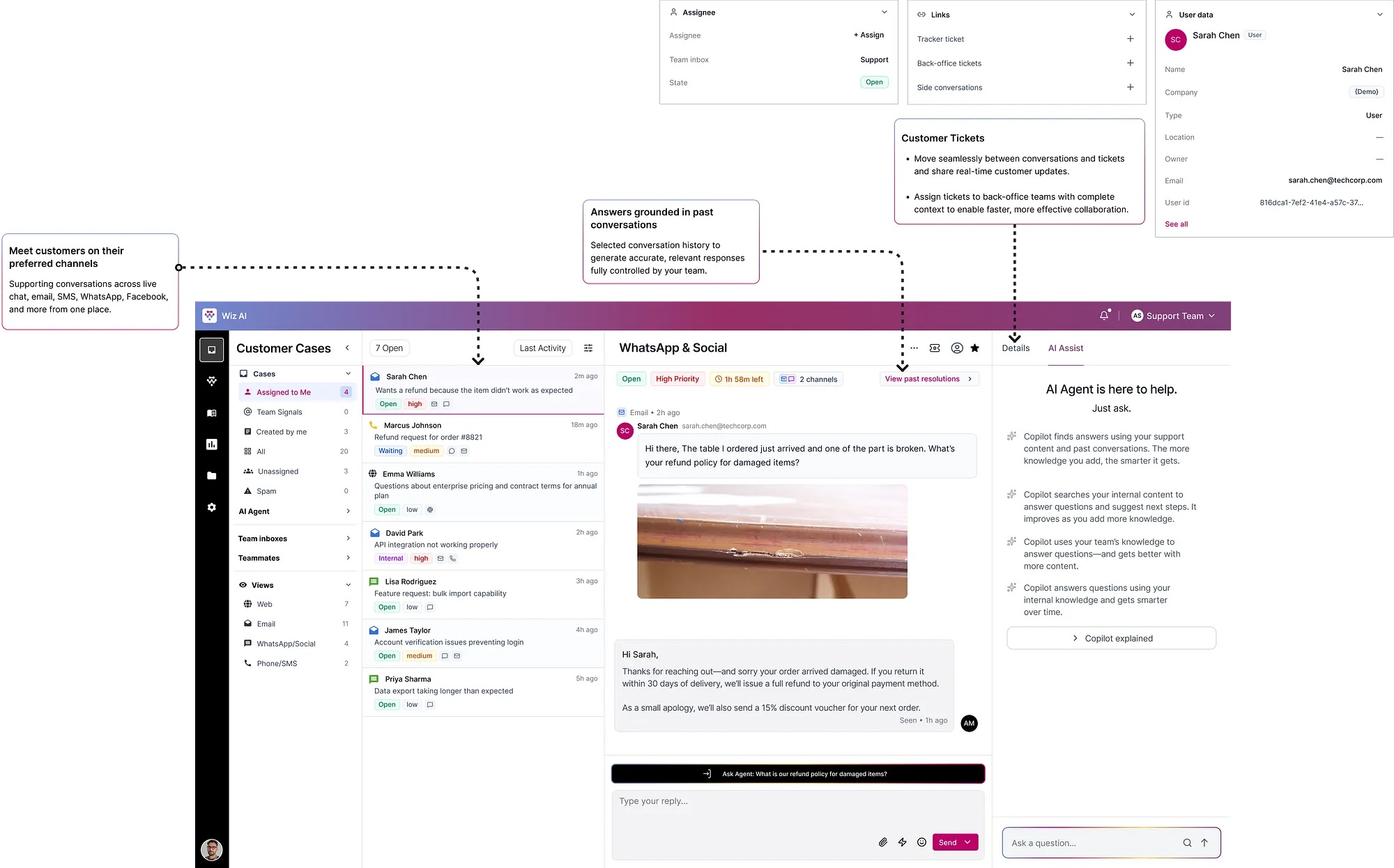
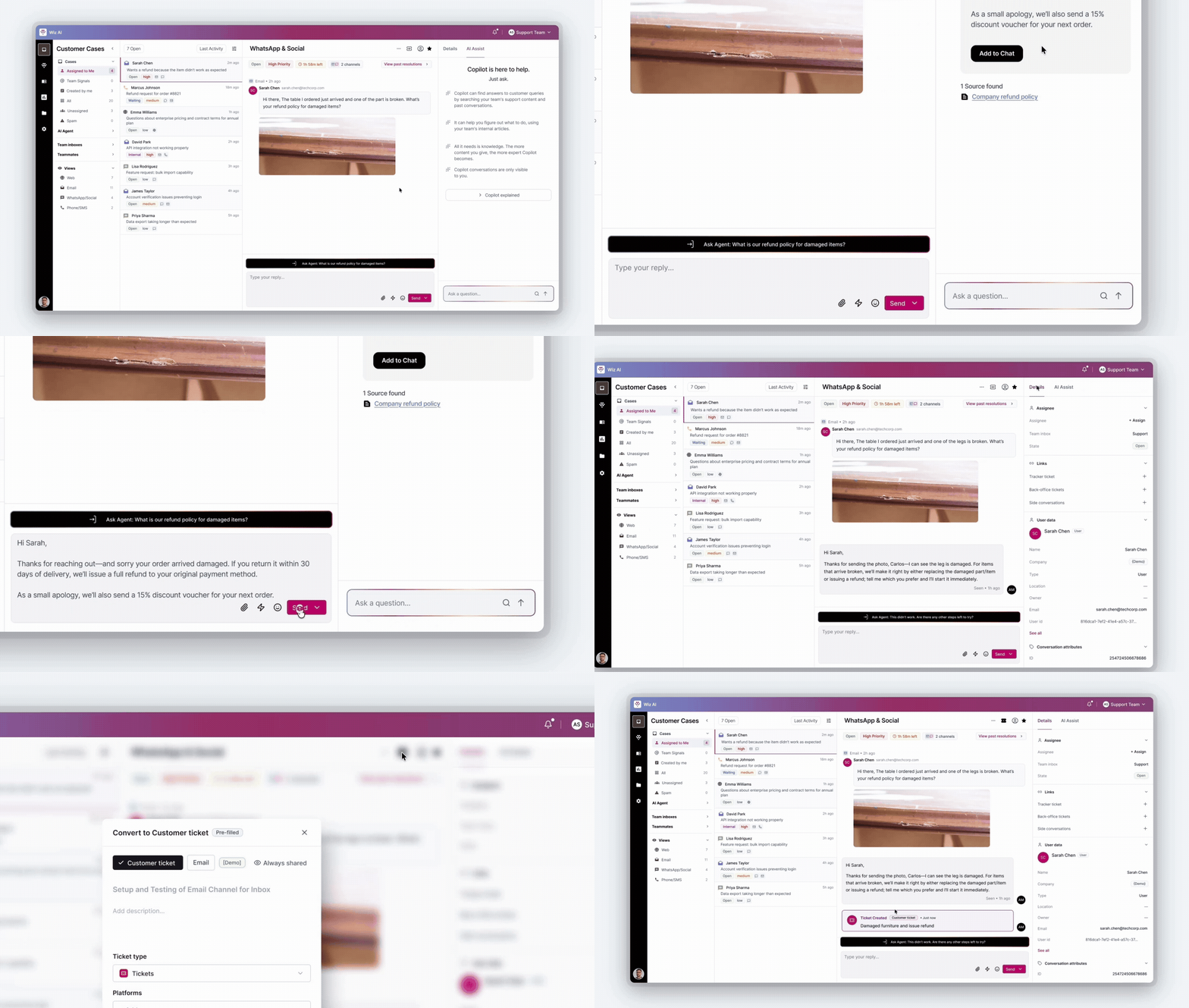
Policy documents lived on a corporate intranet nobody read. Decisions were made from memory. When memory failed, agents guessed.
Ask Copilot uses RAG to search the company's proprietary SOP database, retrieve the exact governing paragraph, and force the LLM to reason exclusively on that retrieved policy — not general knowledge.
Trade-off → Sources last updated >90 days are flagged. Low-confidence responses show a "Verify before sending" warning — never presented as ready-to-send.
Teams couldn't trust AI with high-stakes decisions. The trust ceiling sat at 40% automation — not because AI wasn't capable, but because there was no human checkpoint for the cases that mattered.
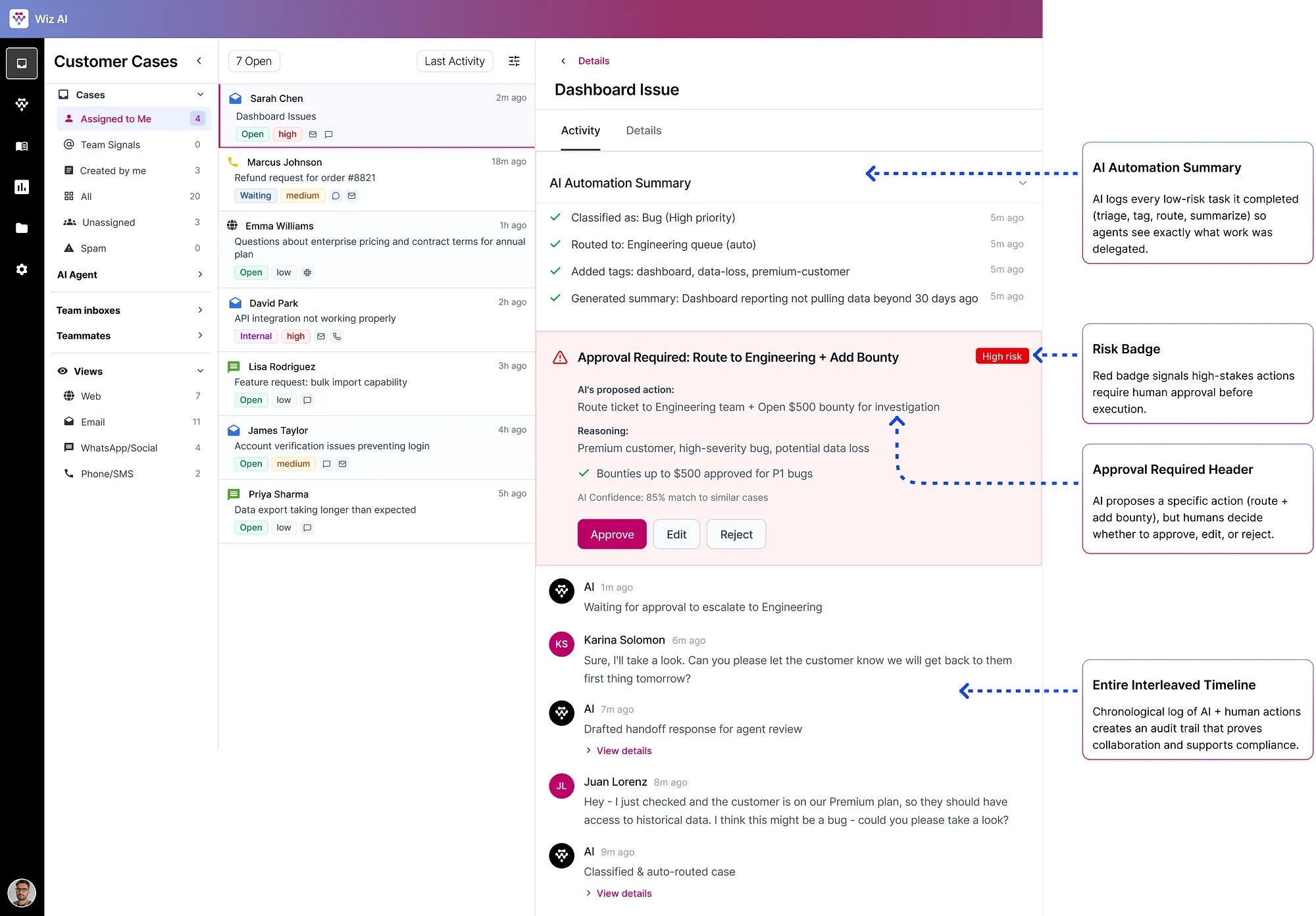
The design decisionControlled autonomy. Not full automation. Not human-only. A precise boundary: AI handles what it can do safely alone. Anything with policy risk, financial impact, or ambiguity goes through an Approval Required checkpoint.
AI handles automatically
Approval Required checkpoint
Route to Engineering + Open $500 bounty
Policy 4.2 · Matched 3 similar cases
83% confidence
The philosophy
This is aviation autopilot design applied to enterprise software. The system flies the plane efficiently, but visibly alerts the pilot when it encounters conditions it isn't programmed to navigate.
What if a human approves something incorrectly?
Approval creates an auditable trail: who approved, when, against which policy version. Anomalies are flagged in analytics.
What if AI is wrong about risk classification?
Agents can manually escalate any case. Risk thresholds are configurable per organization.
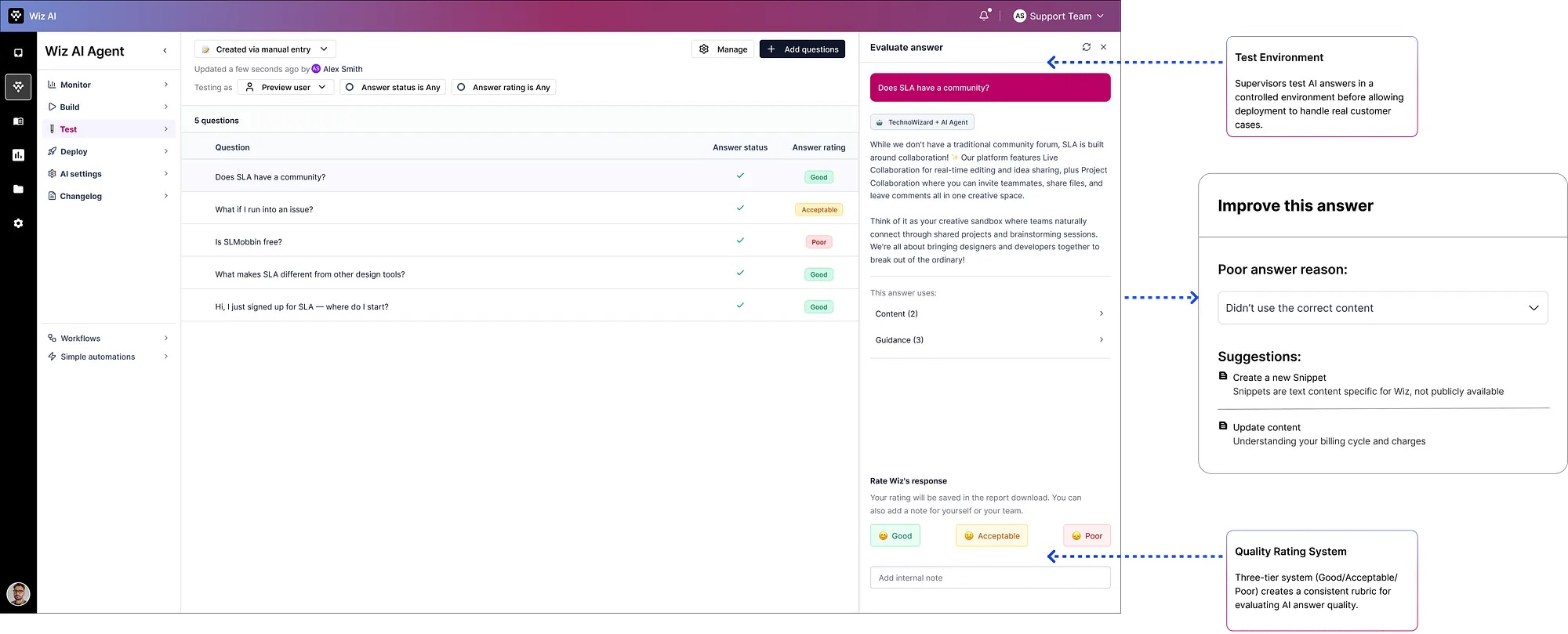
A quality gate before AI ever touches a live customer. Before deployment, supervisors evaluate AI answers. If poor, the system identifies which content source caused the failure, generates recommendations, and the supervisor re-tests.
Phase 01
Case Understanding
Phase 02
Risk Assessment
Phase 03
Policy Grounding (RAG)
Phase 04
Recommendation Generation
Phase 05
Human Control Gate
Phase 06
Action Execution
Phase 07
Feedback Collection
Phase 08
Continuous Learning
01
An AI that gives an answer is a black box. An AI that gives an answer with sources is a tool. The difference between a black box and a tool is the citation. We made citations non-negotiable.
02
We designed confidence scores as first-class UI. Not buried in a tooltip. Visible on the action card. An agent seeing "83% confidence" makes a fundamentally different decision than an agent seeing "Answer generated."
03
Every AI-generated state has a human override path. No dead ends. No locked decisions. The AI proposes. The human disposes. Always.
04
We spent more time designing the failure states than the success states. What does a low-confidence response look like? What happens when the policy source is stale? Designing for failure first means success states feel obvious by comparison.
05
Every interaction is training data. So we designed feedback to be frictionless: one click for good/poor, optional text field, shown immediately after resolution — not in a separate review flow.
Challenge 01
Challenge 02
Challenge 03
Challenge 04
Sarah messages WhatsApp: "Table arrived broken. Refund?" — same message, new system.
Agent View — Case #4521
AI Automation Summary
Classified as damaged goods, medium risk, policy retrieved. Customer history reviewed. Premium tier confirmed.
Issue full refund per policy 4.2 + 15% voucher for Premium customers
Company Refund Policy, Article 4.2 · Freight Damage
91% confidence
Total agent time: 90 seconds ✓
15–20 min
Resolution time
2–5 min
AI gathered context before agent opened the case
65–85%
Policy accuracy
95%+
Grounded in cited policy, verified by a human
30–40%
Automation trust
60%
Teams could see exactly when and why AI asked for help
Frontline Agents
No longer data gatherers frantically copy-pasting between five browser tabs. Reduced cognitive load. Reduced burnout from repetitive low-value work.
Support Leads & Managers
Structured, consistent, auditable data on exactly how decisions are being made. If a policy is failing, they can see exactly which phase of the AI pipeline is misinterpreting the rule and fix it globally in minutes.
Audit, Finance & Compliance
Every refund, account change, clinical authorization leaves an immutable audit trail: which policy, which AI model version, which human approved it.
TechnoWizards repositioned entirely. No longer viewed as a chatbot vendor that plugs into Zendesk. Became a primary AI-native customer service suite. Moved significantly upmarket — capable of displacing the very legacy systems they used to merely augment.
Start with the failure states
We spent too much time designing happy paths early. The most valuable design decisions came from asking "what happens when this goes wrong?" I'd flip the order next time.
Involve compliance teams earlier
We brought in the compliance perspective late. Their requirements reshaped the audit trail design significantly. Earlier involvement would have saved two iteration cycles.
Build the feedback loop UI in Phase 1
We deferred agent feedback UI as "Phase 2." But without it, we were flying blind on AI quality in the first weeks of deployment. It should have been MVP.
Design the analytics dashboard last
We had instincts about what metrics to track. We should have waited until we saw real usage patterns. Vanity metrics crept in early and had to be pruned.
Learning 01
AI design is about trust, not intelligence
The underlying model was sophisticated. What made the product work was the infrastructure of trust around it — citations, confidence scores, audit trails, human gates.
Learning 02
System thinking before screen thinking
The most impactful design decisions happened before Figma was opened. The system map defined the product. Figma documented it.
Learning 03
Design for decisions, not just interfaces
Every screen exists to help someone make a better decision faster. If a screen isn't helping someone decide something, it's wasting space.
Learning 04
Constraints are the design
No telemetry. No user requirements. Eight months. Each constraint forced a creative solution that led to a better outcome than a comfortable process would have produced.
Benchmark platform — Fin AI resolves 87% of routine queries. Studied their helpdesk architecture, Copilot design, and handoff patterns.
Visit →Legacy helpdesk system that TechnoWizards clients were using before Wiz AI. Used as competitive baseline for workflow and UI patterns.
Visit →Original case study documentation — the full written record of the design process, research findings, and design decisions.
Read →The next time you interact with a piece of software, look past the interface and ask: is this system optimizing the conversation — or the decision?